DejaView

The private photo streamer for DAKboard.

Stream photos from Apple Photos or hard-drive folders to DAKboard, Home Assistant, MagicMirror, and any display on your network. Runs from your Mac's menu bar. Your photos never leave home.

See how it works

How It Works

01

Select

Choose albums from Apple Photos (including Smart Albums and Shared Albums) or select folders directly from your hard drive.

02

Serve

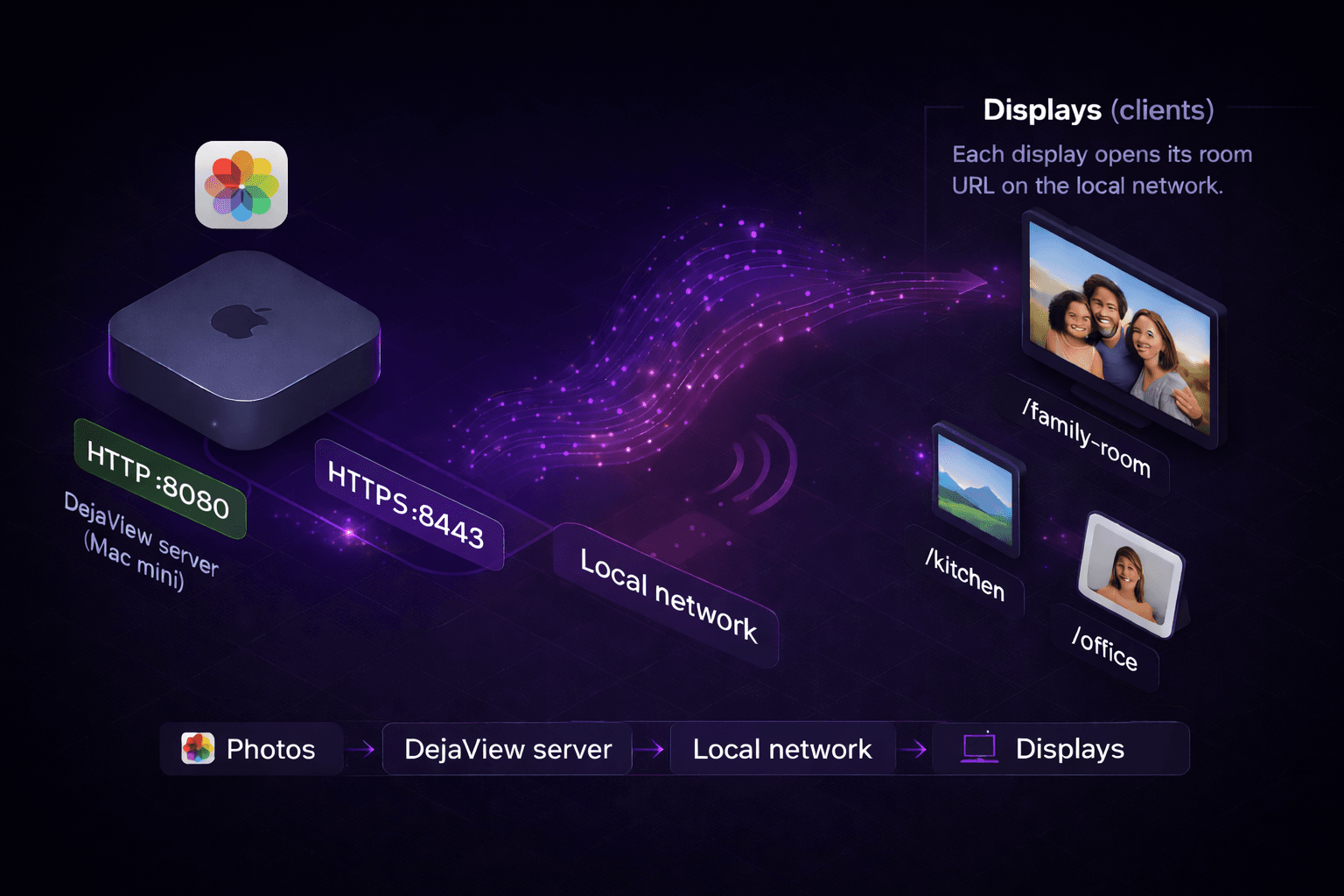
DejaView creates local network URLs for each album, served right from your Mac's menu bar.

03

Display

Point your DAKboard, Home Assistant, or any display to the URL. Photos update automatically.

DejaView architecture — Mac serves photos over local network to multiple displays
Example: https://dejaview.local:8443/family-photos.jpg

Lives in Your Menu Bar

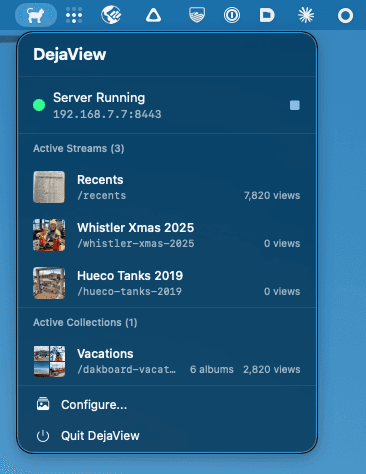
DejaView runs quietly in your Mac's menu bar. Click the icon to see active streams, view counts, and server status at a glance.

DejaView cat icon in the macOS menu bar with dropdown showing server status, active streams and collections with view counts

Powerful Configuration

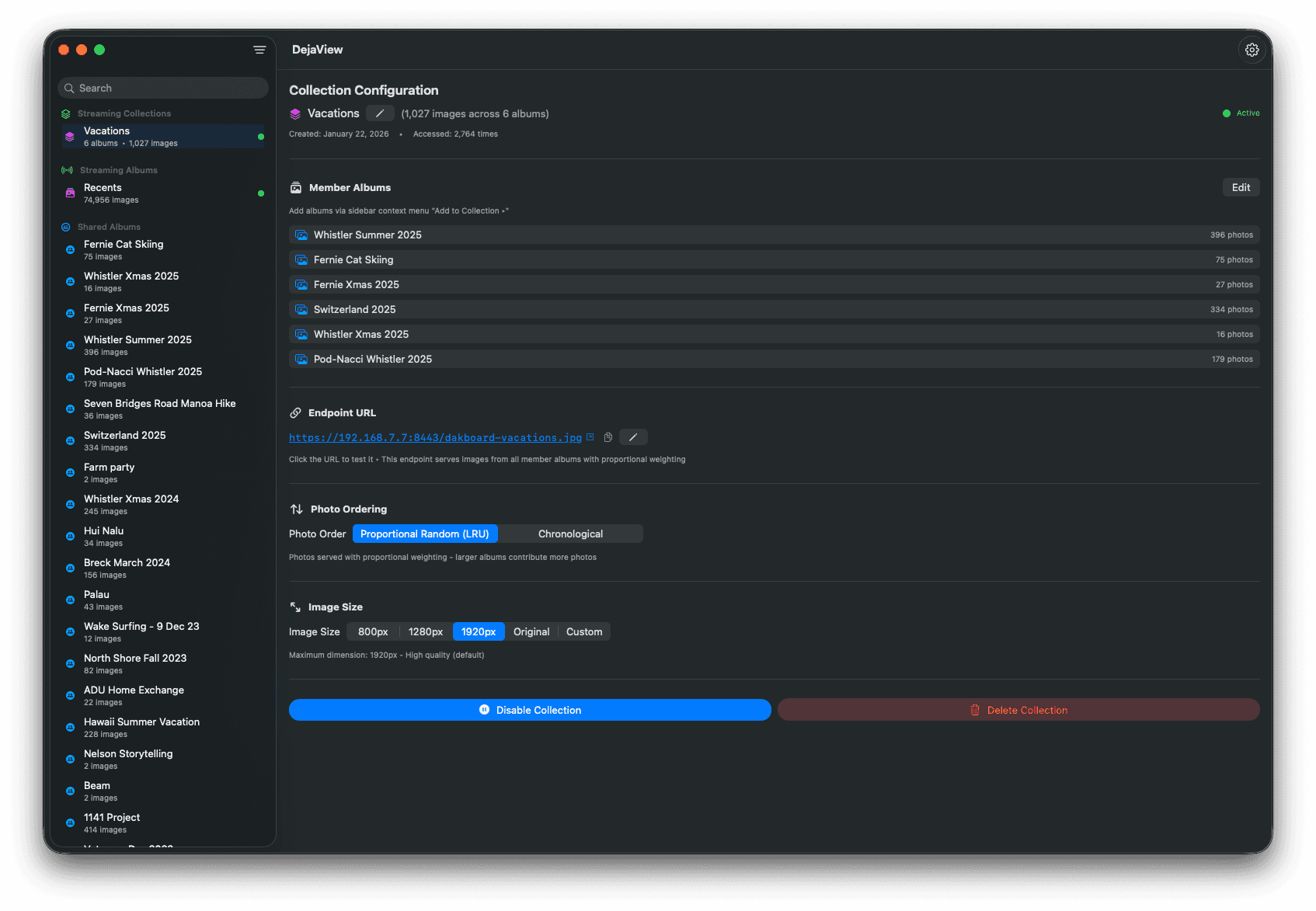
Create collections from multiple albums with proportional weighting, set photo ordering, choose image sizes, and manage endpoints — all from a native macOS interface.

DejaView configuration window showing collection setup with member albums, endpoint URL, photo ordering options including proportional random LRU, and image size presets

Beautiful on DAKboard

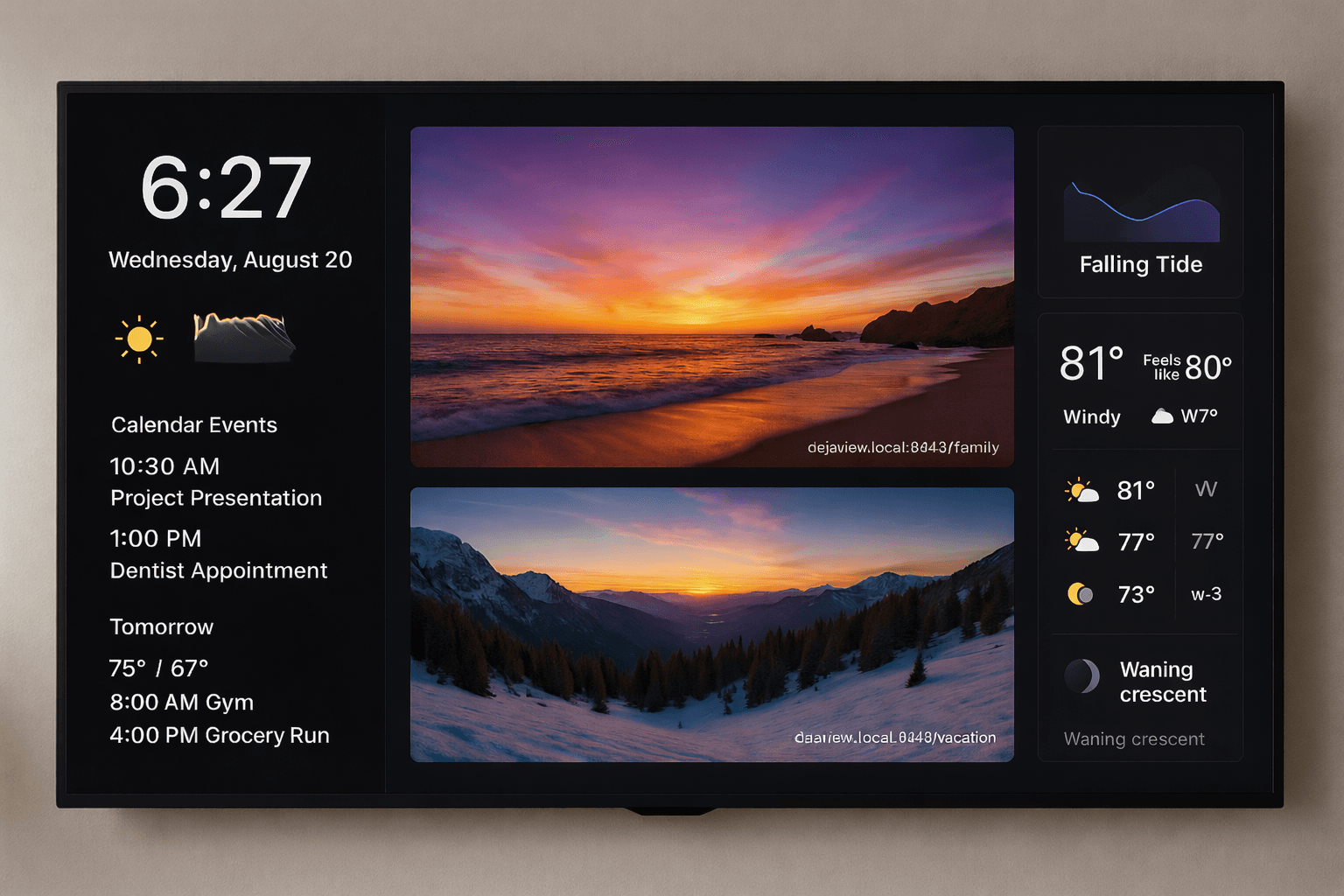
Your photos on DAKboard alongside weather, calendar, tides, and more — all powered by a simple URL from DejaView.

DAKboard mockup showing photos served by DejaView alongside weather, calendar, and tide information

Setup in 3 clicks

Add a Photo URL block in DAKboard, paste your DejaView URL, done. Your photos rotate automatically with no cloud service needed.

Get started

Everything You Need

Privacy First

Photos never leave your local network. No cloud uploads. No tracking. No data collection.

Smart Rotation

LRU algorithm ensures variety. Never see the same photo twice until you've cycled through them all.

Multiple Streams

Every album becomes its own URL. Kitchen gets family photos. Office gets landscapes.

Built-in HTTPS

Automatic self-signed certificate generation. Secure connections out of the box.

Collections

Combine multiple albums into one stream with proportional weighting. 60% family, 40% travel — you decide.

Menu Bar App

Lives quietly in your menu bar. Configure once and forget. Launches automatically at startup.

Smart Albums

Works with Favorites, Recently Added, Shared Albums, and all your custom Smart Albums.

Flexible Sizing

Configurable per-stream from 800px to original resolution. Optimized for your specific display.

Read-Only Safe

Only reads your photos. Never modifies, moves, or deletes anything in your library.

Works With More Than DAKboard

Any device that can load an image URL works with DejaView.

DAKboard

The primary digital display platform. Photo URL blocks work seamlessly.

Home Assistant

Use the generic camera integration to display your photo streams.

MagicMirror²

Add photo modules pointing to your DejaView endpoints.

Raspberry Pi

Any Pi-based display or kiosk that can load images from a URL.

Any Browser

Open the URL in any browser on your network to see your photos.

Changelog

A running log of the features and fixes in each DejaView release.

v3.0

February 27, 2026

Folder streaming and resilience updates

  • Added local folder streaming support for libraries outside Apple Photos.
  • Added folder-stream thumbnails and improved stream source handling.
  • Improved Photos permission denial handling and introduced server lifecycle refactoring for stability.

v2.0

January 22, 2026

Collections, stream controls, and reliability improvements

  • Added collection editing and improved collection management workflows.
  • Added sidebar search, sort, and stream control polish.
  • Added deferred startup, improved indexing progress state, and HTTPS startup/keychain fixes.

v1.0

August 26, 2025

Initial stream engine and Apple Photos support

  • Added photo stream foundation with smart Apple Photos library filtering.
  • Added HTTPS support with custom certificates and improved settings UX.
  • Improved launch stability and crash/race-condition handling early in release lifecycle.

Simple Pricing

One-time purchase. No subscriptions. No in-app purchases. No cloud fees.

$30

One-time purchase

  • Unlimited photo streams
  • All future updates included
  • HTTPS with auto certificates
  • Family Sharing (up to 6 members)
  • Collections with proportional weighting
  • No internet connection required
Download on the Mac App Store

One-time purchase. Yours forever.

Your Privacy is Not for Sale

Zero data collection
Zero cloud uploads
Zero tracking

DejaView is fully sandboxed, uses read-only photo access, and serves photos exclusively over your local network. We don't even have a server to send data to.

Read our privacy policy