Put your memories
on display.

DejaView streams your Apple Photos (or any photos folder) to DAKboard, straight from your Mac. Read-only, no cloud, no account, no uploads.

For people who'd rather see their photos than store them.

Free · macOS 15+ · Optional Pro upgrade

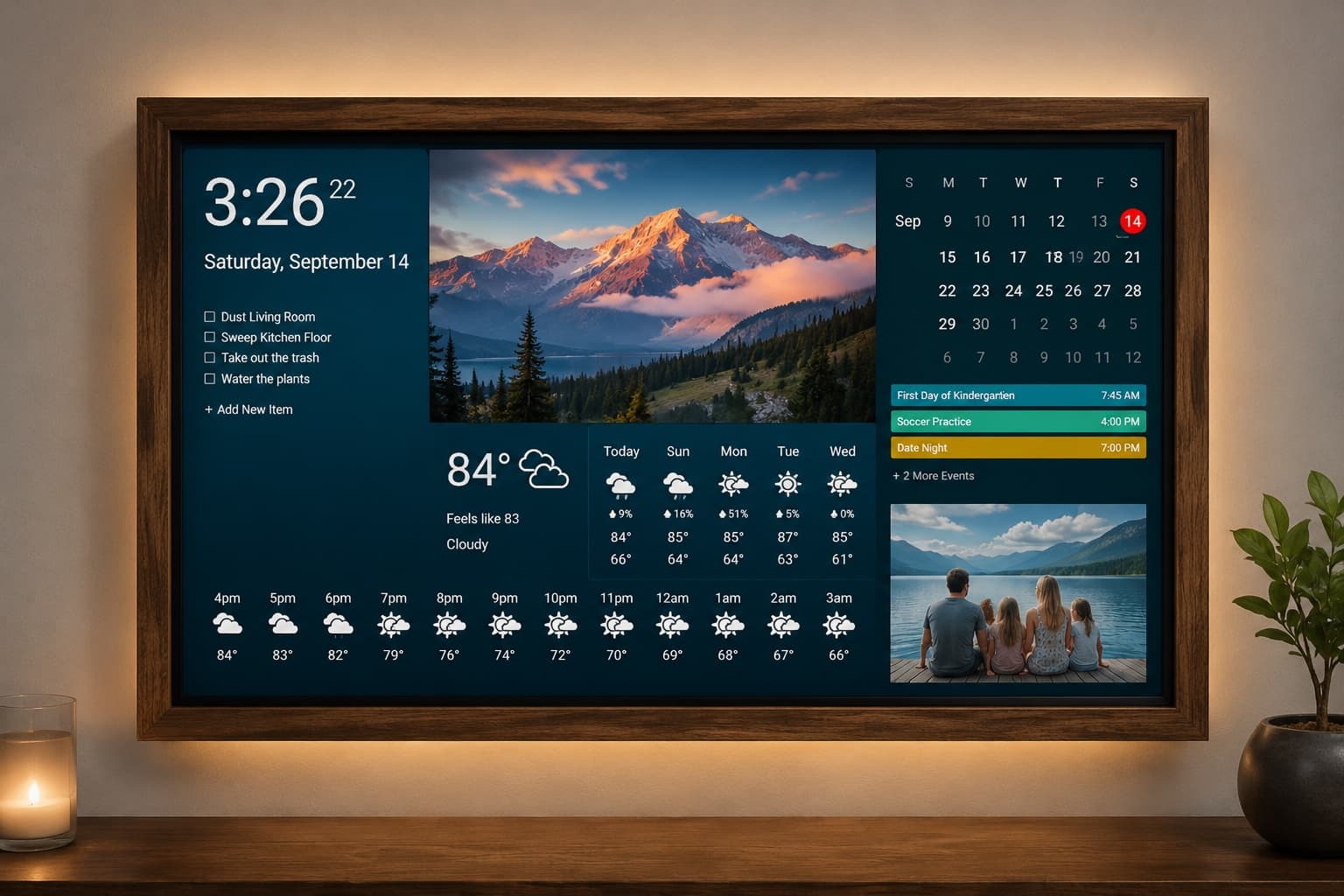
A wall-mounted DAKboard display showing personal photos alongside the clock, weather, calendar, and to-do widgets in a cozy living room

Apple Photos served straight from your local Mac — paste one URL into DAKboard.

How it works

From library to display in three steps.

01

Select

Choose albums from Apple Photos — Smart Albums and Shared Albums included — or point DejaView at any folder on your drive.

02

Serve

DejaView creates a local-network URL for each album and collection, served right from your Mac's menu bar.

03

Display

Paste the URL into DAKboard, Home Assistant, or any display. Your photos rotate automatically — no cloud in between.

Example https://dejaview.local:8443/family-photos.jpg

The app

Designed to disappear.

Set it up once and forget it's there. DejaView lives in your menu bar and keeps your displays fresh on its own.

Menu bar

Lives in your menu bar.

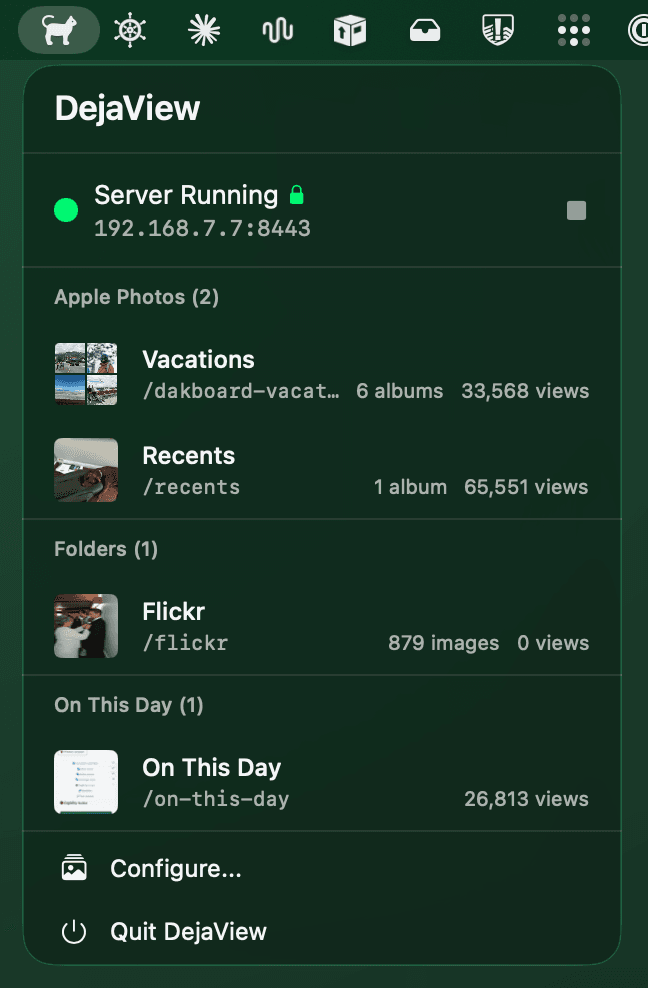
Click the icon to see active streams, view counts, and server status at a glance. No window to manage, no dock icon to hide.

  • Server status and per-stream view counts
  • Launches quietly at login
  • HTTPS lock indicator at a glance
DejaView dropdown open from the macOS menu bar, showing server status and active streams grouped into Apple Photos, Folders, and On This Day with view counts

Configuration

Powerful, never in your way.

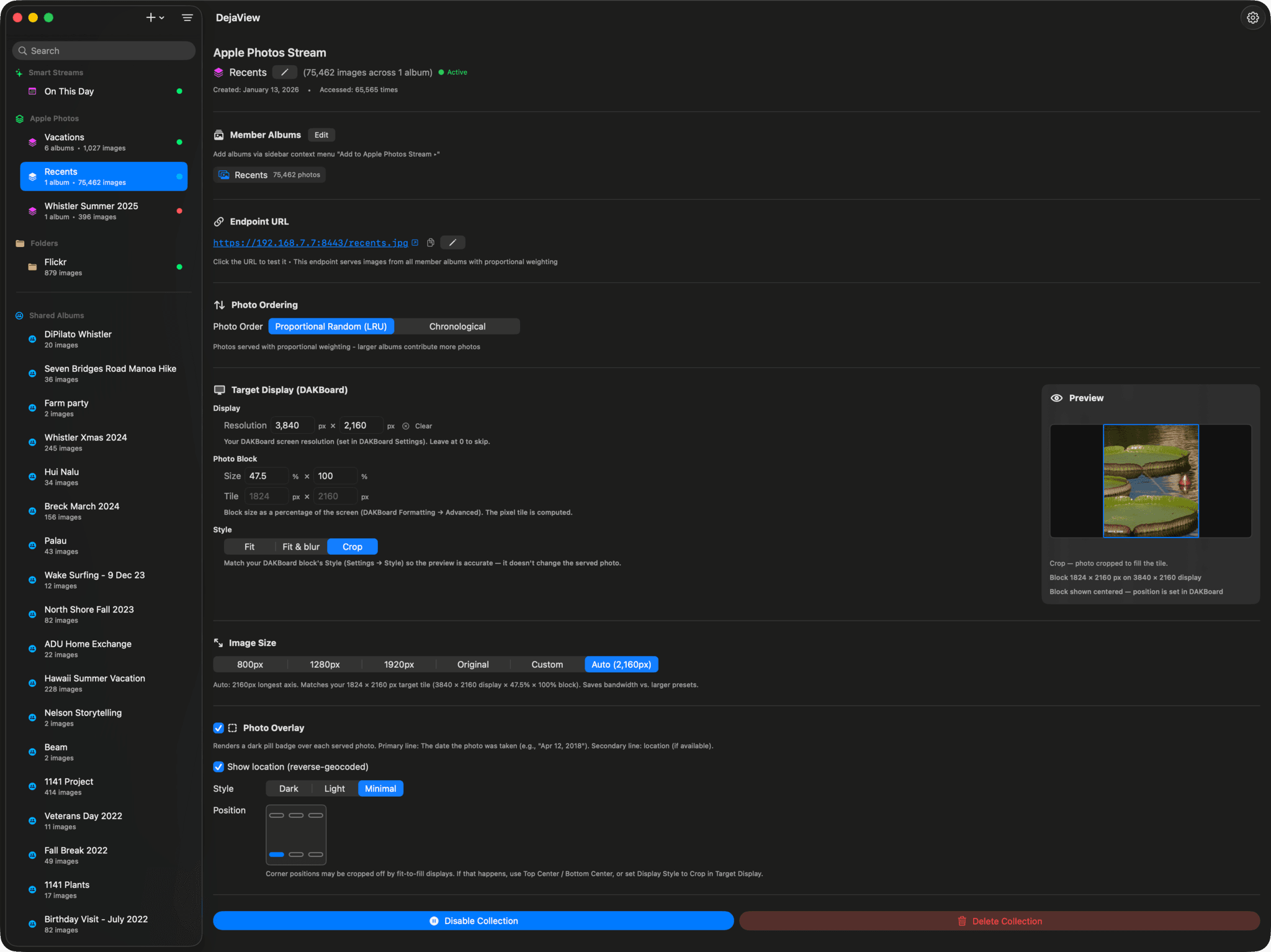
A native macOS window for the moments you do want control. Combine albums or folders into a single stream, tune ordering and image size, and preview exactly how each photo lands on your display.

DejaView Apple Photos stream configuration: member albums, endpoint URL, photo ordering, target display sizing, image size presets, photo overlay options, and a live crop preview
  • Combine albums or folders with proportional weighting
  • Live preview shows the exact DAKboard crop
  • Per-stream ordering, resolution, and date overlays

Features

Little details, big payoff.

Thoughtful touches that make a set-and-forget app a pleasure to live with.

Privacy First

Photos never leave your local network. No cloud uploads. No tracking. No data collection.

Smart Rotation

LRU algorithm ensures variety. Never see the same photo twice until you've cycled through them all.

Multiple Streams

Every album becomes its own URL. Kitchen gets family photos. Office gets landscapes.

Built-in HTTPS

Automatic self-signed certificate generation. Secure connections out of the box.

Collections

Combine multiple albums into one stream with proportional weighting. 60% family, 40% travel — you decide.

Menu Bar App

Lives quietly in your menu bar. Configure once and forget. Launches automatically at startup.

Smart Albums

Works with Favorites, Recently Added, Shared Albums, and all your custom Smart Albums.

Flexible Sizing

Configurable per-stream from 800px to original resolution. Optimized for your specific display.

Read-Only Safe

Only reads your photos. Never modifies, moves, or deletes anything in your library.

Compatibility

Works with the screens you already own.

If a device can load an image URL, it can show your photos.

DAKboard

The primary digital display platform. Photo URL blocks work seamlessly.

Home Assistant

Use the generic camera integration to display your photo streams.

MagicMirror²

Add photo modules pointing to your DejaView endpoints.

Raspberry Pi

Any Pi-based display or kiosk that can load images from a URL.

Any Browser

Open the URL in any browser on your network to see your photos.

Plans

Free forever. Pro for more.

500 fresh photos to start, then a new one each day — free, for as long as you like. Pro lifts the limit so your displays refresh as often as you want.

FreePro
Apple Photos & folder streaming
Collections with proportional weighting
HTTPS with auto-generated certificates
Local network only — no cloud, no account
Fresh photos500, then 1/dayUnlimited
On This Day streams
No upgrade reminders on your photos
Every stream, every display
All future Pro features

Upgrade to Pro for $1.66/month, or a one-time Lifetime unlock.

Bought DejaView before v6.0? You keep lifetime Pro at no charge — launch the app while signed into the same Apple ID and Pro unlocks automatically.

Privacy

Your photos never leave home.

Zero data collection
Zero cloud uploads
Zero tracking

DejaView is fully sandboxed, uses read-only photo access, and serves photos exclusively over your local network. We don't even have a server to send data to.

Read our privacy policy

Changelog

Always getting better.

A running log of the features and fixes in each DejaView release.

v7.0

June 6, 2026

Unified Apple Photos & Folder streams, Active Hours, and a live stream preview

  • Simplified streams into two clear types — Apple Photos and Folders — each able to hold one or more sources. A single album and a collection of albums are now the same thing, as are a single folder and a group of folders; add or remove albums and folders right inside a stream's settings.
  • Existing streams migrate automatically on launch and keep their exact URLs, so your DAKboard displays keep working with no changes.
  • Folder streams can now serve photos from multiple folders at once, blended into a single rotation.
  • Added Active Hours — pause photo rotation overnight (on by default in Settings → General). Outside your set window each display simply holds its last photo, so you don't burn through your rotation while nobody's watching.
  • Added a live stream preview that renders each photo exactly as your wall display receives it — same date/location badge, crop, and sizing — continuously streaming fresh, never-repeating samples without disturbing your live rotation.
  • Added Display Style (Fit / Fit & blur / Crop) that mirrors DAKboard's own options, so your DejaView preview lines up with how DAKboard lays each photo into its block.

Put your photos on every screen.

Free to download, set up in three clicks, and private by design. Your memories, on the displays you already own.

Free · macOS 15+ · No account required